Advertisements
Searching “GTA San Andreas mobile free” is tempting, but most results promise shortcuts that put your phone and accounts at risk. The good news: Yes, there are legal and safe ways. to play on iOS and Android.
The first option, for those who already pay for Netflix, is download the Netflix edition of the game, at no extra cost within the subscription. It's official, installs from the store, and doesn't require any weird APKs.
Advertisements
The second option is buy the mobile version of Rockstar on the App Store or Google Play. It's the complete classic, optimized for touchscreens, with cloud storage and controller support.
Here I explain both routes step by step, what you need on your computer, and how to avoid common traps that promise "free" and end in malware or data theft. Playing is fine; getting into trouble, no.
Advertisements
See also
- Apps for selling and buying used items
- Apps for inspection and maintenance
- The cheapest luxury cars
- Vitality Tea: A cup that wakes you up without overwhelming you
- Tea for constipation
First of all: what is legal and what is safe
I can't help you hack nor to skip app payments. In addition to being illegal, unofficial downloads often come with aggressive ads, malware, and invasive permissions. The safe way is to install from the official store and with a recognized developer, because that gives you updates, real reviews, and permission control. In the case of GTA, the two legitimate paths today are: 1) the version GTA: San Andreas – NETFLIX (included with your subscription), and 2) Grand Theft Auto: San Andreas published by Rockstar Games (one-time purchase). Both are listed on the App Store and Google Play, with a clear notice from the publisher and system requirements.
Option 1 — Play “for free” with your subscription: GTA: San Andreas – NETFLIX
If you already have Netflix, you can play without paying extra: Search “GTA: San Andreas – NETFLIX” in your store, install it and then log in with your Netflix account. It is the Definitive Edition for mobile devices, with improved lighting, textures, and modernized controls, and appears as a separate app on iOS and Android. Remember: you need an active Netflix account and a compatible device; if your device doesn't qualify, the store will let you know. If you have any questions, Netflix explains how to install games from the App Store/Play Store and play them by linking your profile. It's 100% legal and has no extra ads, all managed by Netflix.
Official Download (Netflix Games):
• iOS — GTA: San Andreas – NETFLIX (App Store). Apple
• Android — GTA: San Andreas – NETFLIX (Google Play). Google Play
Option 2 — Buy the classic Rockstar mobile version
If you prefer to buy it once, install Grand Theft Auto: San Andreas of Rockstar Games. It's the mobile port of the full game, with over 70 hours of campaign, cloud saves (via Social Club on iOS) and support for Bluetooth controllers. Check that the publisher is Rockstar Games and avoid clones or listings with confusing names. The official listings on both stores clearly state the content, controls, and compatibility. Paying in-store ensures updates and technical support, and avoids surprises from modified versions.
Official Download (Rockstar):
• iOS — Grand Theft Auto: San Andreas (App Store). Apple
• Android — Grand Theft Auto: San Andreas (Google Play). Google Play
Requirements, space and controls: avoid failed downloads
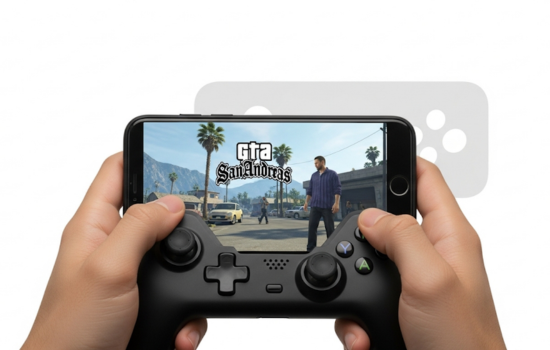
Before installing, check system version, free storage and compatibility. Current editions weigh several GB between the base app and additional data; leave some extra room for the game to update without errors. If you plan to play with commandCheck the store listing for controller and Bluetooth support; on iOS, Rockstar indicates “Made for iOS” compatibility, and the Netflix edition has also documented controller support in user discussions. If you have an older phone, prioritize closing background apps and using the system's performance mode. To avoid endless downloads on public networks, use stable Wi-Fi or data with good coverage.
Avoid risks: APKs, miracle mods, and dubious offers
Be wary of websites that offer “free GTA San Andreas” outside of stores. Third-party APKs They can ask for dangerous permissions (SMS, contacts, accessibility) and install ads or Trojans. You'll also see "mods" that promise infinite money or "4K" graphics; in addition to being unstable, they often violate terms and expose you to bans from related services. Another common scam: pages that claim to "activate" it with surveys or by installing other apps. The result, besides being annoying, is rarely the real game. If you want save money, wait for official offers in stores or play the Netflix edition with your active subscription. It's the clean, no-surprises way.
Download and Performance Tips: Start Right the First Time
- Stable connection. Download over trusted Wi-Fi and leave the screen on during data plan installation.
- Plenty of space. Leave at least 2–3 GB free in addition to what the store asks for for cache and updates.
- Touch controls. In the settings, lower the sensitivity and activate aids like “aim assist” until you get used to it; then increase them.
- Bluetooth controller. Pair before launching the game; some titles detect the controller at startup.
- Saved in the cloud. Turn on sync so you don't lose progress if you change phones.
- Battery. The game is demanding; play at medium brightness and close heavy background apps to avoid stuttering.
If something is wrong (Wi-Fi captive portal, permissions), restart the game or phone and check the store listing to see if there is a recent update that fixes the bugs.
Closing: “Free” for real?
Free legal It means that it's included in a service you already pay for (Netflix) or in a temporary official promotion. Anything other than that is usually piracy with real risks. Choose official store either Netflix editionCheck compatibility and enjoy San Andreas on your mobile with peace of mind. Better a safe route than fixing an infected phone.